ここから本文です。
Usage
Using the subway
Using ticket-vending machines
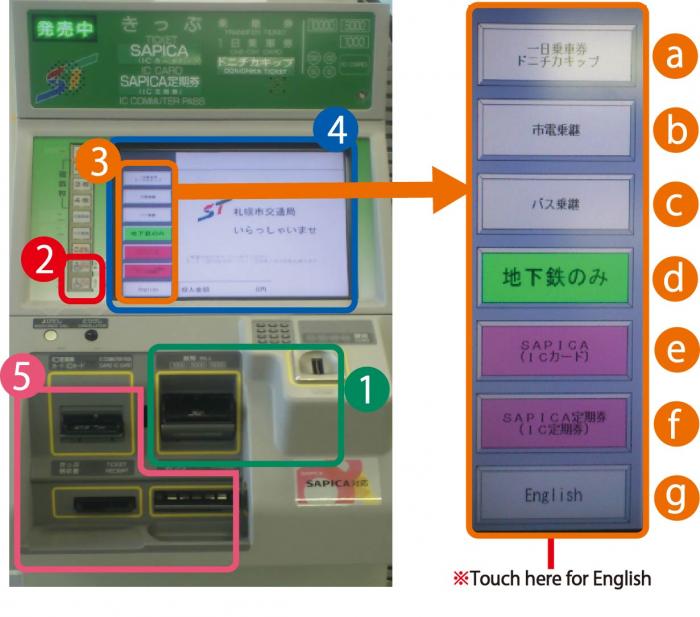
Ticket-vending machines
※The photo shows only one type of ticket-vending machine; other types exist.
 Money slots
 Child button/welfare button
 Ticket/language selection buttons
 Touch panel
 Ticket/card/change delivery slots
 One-Day Card/Donichika Ticket
 Transfer to streetcar
 Transfer to bus
 Subway only
 SAPICA
 SAPICA Commuter Pass
 English ※Touch here for English.
|
Purchasing tickets/One-Day Cards/SAPICA IC Cards |
Charging SAPICA IC Cards |
|---|---|
|
|
Select the SAPICA charge button. |
|
|
Select “Open” or “Registered.” |
|
|
Select the desired amount to be charged. |
|
|
Insert the required amount. |
|
|
Take the SAPICA IC Card and change. |
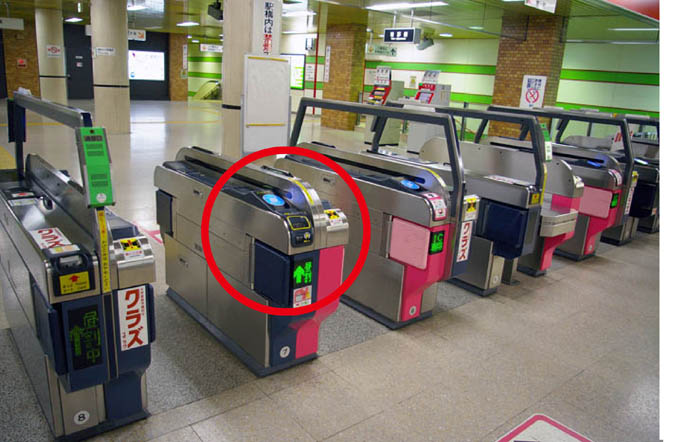
Automatic ticket gates
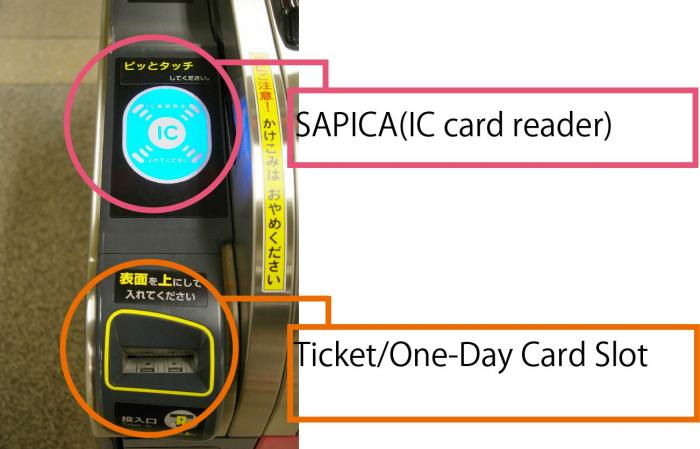
- Insert the ticket or card when passing through the ticket gate.
- Be sure to take the ticket or card when it comes out, as it will be needed at the destination station.
- Insert the ticket or card when passing through the ticket gate at the destination station.
※Just touch the reader with the SAPICA IC Card when passing through the ticket gate.
Getting on/off streetcars
About the route map of streetcars